


New York Magazine
4.015.00 Reviews
App Specs
- Version
- 1.0.37
- Updated On
- License
- Free
- Downloads
- 10,000+
- Developer
- Vox Media Engineering
- Categories
- News & Magazines
- Platform
- Android
Screenshots
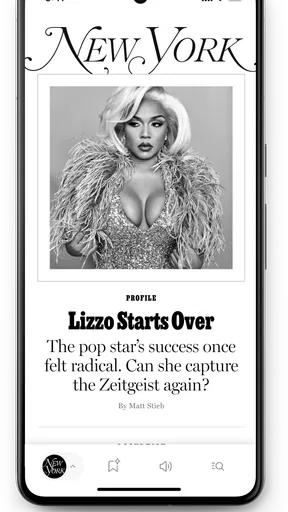
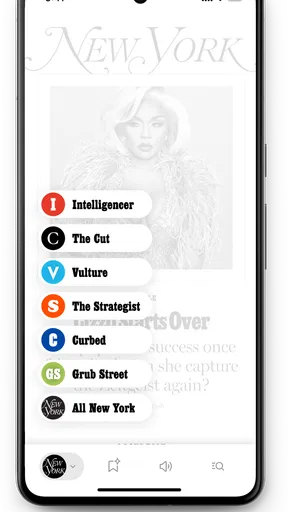
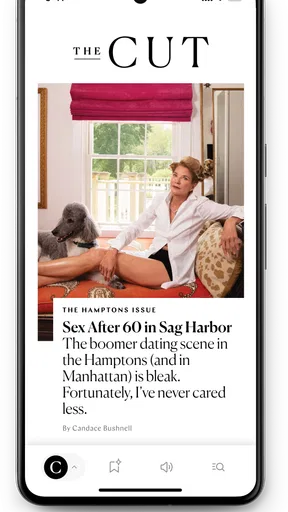
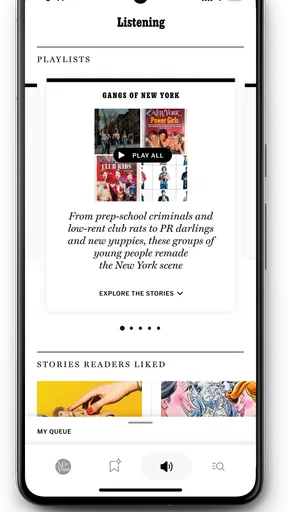
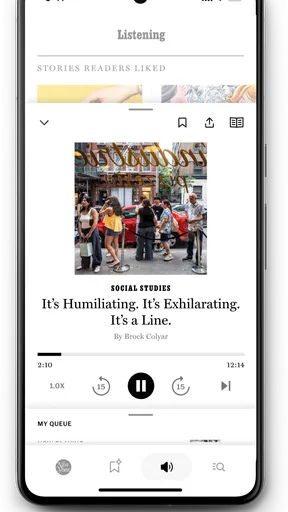
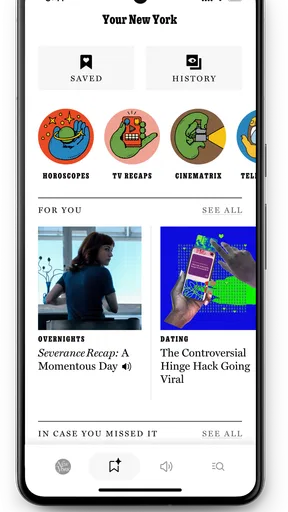
 Analysis by AppCompare
I approached New York Magazine as a decision rather than a quick download: is it worth adding another news app when most phones already have a browser, a general news reader, and perhaps a few social feeds? My answer is cautiously positive. This is a focused publication app in the News & Magazines category, aimed at readers who want New York Magazine’s particular mix of reporting, commentary, culture, and city-aware perspective in a dedicated mobile space.
The app is free to install, and its age rating is Teen, which makes it reasonably approachable for older teenagers and adults who want a publication-centered reading habit. It comes from Vox Media Engineering, and the current release is version 1.0.37. That combination tells me I am looking at a relatively new mobile experience rather than a long-established utility with years of accumulated interface baggage.
That distinction matters. A dedicated magazine app should make it easier to move from one article to the next, return to a story later, and keep the publication’s voice separate from the noise of a general-purpose feed. It should also justify its place on the home screen. After spending time with it, I see the strongest case for people who already seek out New York Magazine’s work and want a more direct reading route. I am less convinced it is the best first choice for someone who simply wants the broadest possible breaking-news coverage.
How I would decide whether it belongs on your phone
I’d decide by giving the app one clear job: being the place I turn when I want New York Magazine, rather than expecting it to replace every news source on my phone. After a few ordinary reading sessions, I’d ask whether it makes that choice easier and more deliberate. That practical test leads to the trade-offs I’d weigh against other reading options.
Start with your reading habit, not the download price
The free price removes the most obvious barrier, but it does not answer the important question: will this app change how you consume journalism? If you usually open a browser, search for one article, and leave, the app may feel like an extra step. If you prefer opening one place and browsing a publication’s latest work, the dedicated format makes more sense.
I would also consider whether you value a recognizable editorial point of view. New York Magazine is not trying to be a neutral list of every headline from every source. Its appeal is the publication itself: its subjects, tone, analysis, and cultural lens. That can be a strength when you want context and personality, but it is not necessarily what you want when your only goal is a fast, wide scan of world events.
The public response gives the app a useful but still limited signal. It holds a 4.0 average from around 38 ratings, with about 15 written reviews. I would treat that as an early impression rather than a final verdict. The app has also passed 10 thousand installs, enough to show that people are trying it, but not so much that every possible phone, reading style, or accessibility preference has been represented.
Worth Reading Before You Choose

EA SPORTS FC Mobile 26 Is a Bigger Football Game, but It Takes Time

Flipboard Shows What News Apps Must Do Beyond the Feed

Switching to Android Auto Means Rethinking Your Driving Routine

Google Calendar Makes a Crowded Week Easier to Manage

Ludo King Makes the Most of the Minutes Between Plans

Baby Panda World Brings Quick Play to Modern Phones, but Its Game Library Feels Busy
Think about the kind of news you return to
A general news aggregator is usually strongest when you want breadth. It can place politics, technology, sports, business, and local stories beside one another, often from many publishers. A browser is strongest when you already know what you are looking for. A social feed is strongest at speed, though it can be distracting and unpredictable. This app makes the most sense in the space between those choices: a direct doorway into one publication’s editorial world.
That makes it particularly suitable for a short daily check, a longer weekend read, or a moment when you want to follow a subject beyond the headline. I would not install it expecting a complete replacement for every other source. I would install it because I want New York Magazine to be one of my regular sources, without relying on search results or an algorithmic feed to surface its work.
A realistic everyday routine
Imagine a commuter with ten minutes before work. Instead of opening a social network and losing that time to unrelated posts, they open the app and scan the publication’s current selection. One story may be worth reading immediately; another may be better saved mentally for a quieter evening. That routine is where a publication app can earn its place: not by replacing the entire internet, but by giving a familiar editorial destination a deliberate starting point.
For a student, the value can be different. The app may become a way to encounter cultural criticism, political analysis, or city-focused reporting without first deciding which search terms will produce useful results. For a reader who already follows the magazine, it can reduce the friction between remembering an article exists and actually reading it.
Where the dedicated format helps
The biggest advantage is focus. When I open a publication-specific app, I am less likely to confuse the source with a mixed stream of reposts, commentary, and unrelated recommendations. That separation helps me judge an article on its own terms. It also makes the app feel more intentional than a browser tab that disappears among dozens of other pages.
There is a quieter benefit too: a dedicated app can support a repeatable habit. I can decide that this is where I check New York Magazine, rather than depending on a search engine, social post, or newsletter to remind me. That predictability is valuable for readers who want to follow a publication consistently instead of encountering isolated articles by chance.
What it does well, and where another option may fit better
I find the strongest reason to keep it is the convenience of returning directly to a publication whose coverage and voice I already value. The counterweight is that a single-publication app cannot serve the same purpose as a broad reader when I want many outlets or topics at once. Looking at both sides makes it easier to decide whether this focused role is useful enough to keep.
The strongest case is loyalty to the publication
If you already know that New York Magazine’s editorial voice suits you, this app is easier to recommend. The application is built around that single identity, so the decision is not really “Which news app has every topic?” It is “Do I want a direct mobile home for this magazine?” For existing readers, the answer can be yes even if they also keep a general news app installed.
I also like the clarity of the proposition. The store summary presents it as the new New York Magazine app, and the short description is simply New York Magazine. That is unusually direct. It does not pretend to be a universal news dashboard or a replacement for every source. As a reader, I know what I am choosing before I install it.
Three practical ways to get more from it
First, use it as a publication checkpoint rather than a constant alert stream. Opening it at a planned time can make the experience more useful than repeatedly checking throughout the day. The point is to read with intention, especially when the app is competing with faster but less focused feeds.
Second, separate discovery from deep reading. I would scan the available stories when I have a spare minute, then reserve longer pieces for a time when I can concentrate. This small change prevents a thoughtful article from becoming something I skim while waiting in line. It also helps reveal whether the app is genuinely improving your reading routine or merely adding another icon.
Third, compare what you find here with your usual broad news source after a week. Do not compare headline counts; compare usefulness. Are you finding analysis you remember later? Are you returning to topics because the coverage feels distinctive? That test is more revealing than judging the app by how busy its front page looks.
Why it may not replace a general news reader
The same focus that attracts one reader may limit another. If you want multiple publishers in one stream, this is not the natural choice. A general news reader will usually reduce the need to jump between separate publication apps. It may also be more convenient for someone who follows many unrelated subjects and wants one broad overview.
I would also hesitate to recommend this as the only news source for someone who needs rapid coverage across many regions or beats. A publication app can be excellent at its own editorial priorities while still being narrower than a wire-service-style feed or a large aggregator. That is not a flaw in this particular app; it is the trade-off of choosing a single magazine as your starting point.
There is another practical limitation: new apps can feel less settled than mature alternatives. With a release date of February 4, 2025, this is still an early-stage product in mobile terms. The current version, 1.0.37, suggests ongoing refinement, which is encouraging, but I would still approach it as an experience that may continue to evolve. Readers who demand years of interface polish and extensive customization may prefer a more established reading tool.
The cost of switching is mostly behavioral
Because the app is free, the real cost is not money. It is attention, storage, and the small effort of building a new habit. You may need to decide whether this app replaces a browser shortcut, sits beside a general news reader, or becomes a second publication destination. Installing it without making that decision can leave it unused after the initial curiosity fades.
Switching is easiest if you give the app a defined job. For example, let it handle New York Magazine reading while your existing aggregator handles broad headlines. That arrangement avoids forcing one app to do everything. It also gives you a fair test: after several reading sessions, you can tell whether the dedicated experience adds value or merely duplicates what you already do in a browser.
For readers who currently rely on social media links, the change may be more meaningful. The app can create a cleaner path to the publication, but it also removes some of the accidental discovery that social feeds provide. If you enjoy finding articles through friends and commentators, keep that route available. If you dislike the distractions surrounding those links, the dedicated app may be a welcome replacement for that part of the process.
Who should install it now
I would recommend trying it if you already read New York Magazine, want a more direct mobile destination, or prefer a publication’s editorial identity to an anonymous stream of headlines. It is also a sensible choice for readers who want to build a small, deliberate news routine around analysis and culture rather than chase every update.
I would skip it, at least for now, if you want one app to cover every topic and source, if you mainly need immediate breaking news, or if you rarely return to the same publication. In those cases, a browser, an aggregator, or a broader news service is likely to fit your habits better. The app’s free installation makes experimentation easy, but free does not mean it will be useful to everyone.
My recommendation after weighing the trade-offs
My recommendation is to treat this as a focused companion, not a universal news replacement. The app’s best quality is its clear purpose: it gives New York Magazine a dedicated place on your phone and encourages a more intentional relationship with that publication. Its main weakness is equally clear: readers seeking maximum breadth may find the single-publication approach restrictive.
I would start with a simple trial period built around real behavior rather than first impressions. Open it when you would normally search for the magazine, read a mixture of short and longer pieces, and notice whether you return because the experience is convenient or because the journalism is genuinely useful to you. If it becomes the easiest way to reach the publication you already value, keep it. If it feels like an unnecessary duplicate of your browser, remove it without regret.
Overall, I see a promising early mobile home for a well-defined magazine identity. The 4.0 average is encouraging, while the relatively small pool of ratings means I would leave room for your own experience to decide. For me, the app earns consideration precisely because it does not need to be everything. If you want New York Magazine itself to become a regular part of your reading routine, this free app is worth trying; if you want the whole news universe in one place, choose a broader alternative instead.
Pros
- Covers New York culture
- politics
- dining
- and entertainment in one app.
- Articles are well edited and offer thoughtful local perspectives.
- Useful city guides help readers discover restaurants
- events
- and neighborhoods.
- Clean layout makes long-form stories comfortable to read on mobile.
- Strong recommendations for food
- arts
- and things to do around the city.
Cons
- Much of the premium content may require a paid subscription.
- Some articles focus heavily on New York City and feel less relevant elsewhere.
- Frequent notifications can become distracting if not adjusted.
- Certain features may depend on a stable internet connection.
- The app may use considerable storage for cached articles and media.
FAQs for New York Magazine
What is New York Magazine, and what can I read in the app?
New York Magazine is a digital publication covering New York City, politics, culture, entertainment, food, fashion, technology, and lifestyle. The app brings together articles from the magazine’s different sections, including features, opinion pieces, reviews, and city guides. It is designed for readers who want a mix of local reporting, national commentary, and long-form journalism in one place.
Is the New York Magazine app free to download and use?
The app can generally be downloaded at no cost, but access to all articles and premium content may require a subscription. Some stories may be available for free, while other content can be limited by a digital paywall. Before downloading, users should check the current subscription options, trial terms, renewal conditions, and pricing displayed in the App Store or Google Play.
Does New York Magazine require an account or subscription?
An account may be needed to save preferences, manage access, or use subscription features. A subscription is typically required for unlimited access to the publication’s complete library and selected premium articles. If you already subscribe through the website or another supported platform, you may be able to sign in within the app, although the available login methods can vary by region and subscription type.
Can I read New York Magazine articles offline?
Offline reading availability may depend on the app version, subscription level, and the type of content being viewed. Some digital magazine applications allow selected issues or articles to be saved for later, while others require an active internet connection. If offline access is important to you, review the app’s current feature description and test the download or saved-content options after signing in.
Is New York Magazine suitable for readers outside New York?
Although the publication has a strong focus on New York City, it also covers subjects that may interest readers across the United States and internationally. Its politics, culture, entertainment, fashion, food, and opinion coverage often discusses broader trends beyond the city. However, readers mainly seeking local news from another region may find the app less relevant than a publication focused on their own area.


